arduino-ci
The main functionality of this script is the configuration and compilation of the sketches and boards matrix. Additionally, it supports the installation of the tools and dependencies required for compilation.
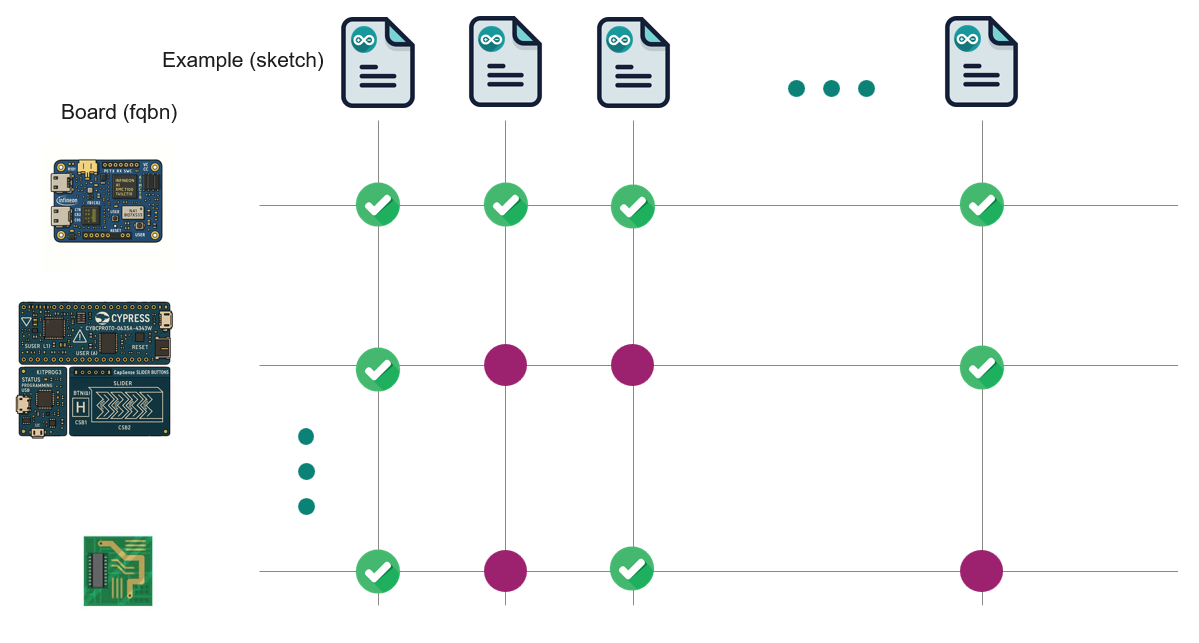
The tool will auto-discover the list of boards and examples available in the asset to create the matrix.
In the case of libraries, a default configuration file is provided for listing the boards in config.
Alternatively, a custom configuration file can be provided to overwrite or complement the default set of boards and sketches in the matrix.
See the YAML configuration matrix specification section for more details.
If the file is named ci-matrix-config.yml, it will be automatically discovered in the root path of the repository asset.
Otherwise, you can specify the file by using the flag -c, --ci-matrix-yml followed by the file path:
python arduino-devops/arduino-ci.py <command> -c path/to/ci-matrix-config.yml
The script needs to know the root path of the asset to be able to discover the boards and examples.
Unless specified, the root path will be the current working directory from which the script is executed.
Otherwise, you will need to specify the root path of the asset by using the flag -r, --root-path followed by the path to the asset’s root directory:
python arduino-devops/arduino-ci.py <command> -r path/to/arduino/asset/root
- For the upcoming usage example, we will assume that:
You have the
arduino-devopsrepository cloned in the root path of the Arduino asset.You have a
ci-matrix-config.ymlfile in the root path of your arduino asset, or that you rely on the auto-discovery of boards and examples based on asset type.
The following commands are available:
config
Shows and queries the ci configuration matrix. This command is helpful within CI/CD workflows in the creation of parallel jobs for the compilation of the sketches and boards matrix.
It supports the following output formats:
JSON (
--jsonor--json-pretty)YAML (
--yaml) .
python arduino-devops/arduino-ci.py config --list fqbn --yaml
You can query the “fqbn” and “sketch” keys by the usage of the flags --list and --filter.
For example, if we want to know which are the matrix board:
python arduino-devops/arduino-ci.py config --list fqbn
Or if we want to know which sketches are included in the matrix:
python arduino-devops/arduino-ci.py config --list sketch
We can use the –filter flag to filter the matrix by a specific board or sketch. For example, if we want to know which sketches are included in the matrix for the Arduino Uno board:
python arduino-devops/arduino-ci.py config --list sketch --filter fqbn=arduino:avr:uno
will list all the sketches to be compiled against the arduino:avr:uno board. Or
if we want to know which boards are to be compiled in the matrix for the “blink” example:
python arduino-devops/arduino-ci.py config --list fqbn --filter sketch=examples/blink/blink.ino
Use the help command to see all the available options:
python arduino-devops/arduino-ci.py config --help
compile
This command compiles the different combinations of the sketch - boards matrix.
This will compile for each board all the applicable sketches in the matrix:
python arduino-devops/arduino-ci.py compile
Without additional arguments, it will look for the sketches and boards based on the ci-matrix-config.yml file if located
in the root path of the repository asset, and/or the auto-discovery of boards and examples based on asset type.
We can only compile a specific sketch by using the --sketch for all the relevant boards:
python arduino-devops/arduino-ci.py compile --sketch examples/blink/blink.ino
Or we can compile all the relevant sketches for a given board by using the --fqbn flag followed by the FQBN of the board:
python arduino-devops/arduino-ci.py compile --fqbn arduino:avr:uno
core-install
To compile the matrix for Arduino libraries, you must first install the package cores for each board in the matrix.
The following command will take care of the installation of all the required package cores:
python arduino-devops/arduino-ci.py core-install
If only the core for one specific board is required, you can specify it by using the --fqbn flag:
python arduino-devops/arduino-ci.py core-install --fqbn arduino:avr:uno
lib-deps-install
If your Arduino asset is a library, it might depends on other Arduino libraries to work.
These are listed in the library.properties file (depends= field) of the library, and can be installed by using the following command:
python arduino-devops/arduino-ci.py lib-deps-install
Warning
This tool only supports constraints which explicitly provide a version. Meaning those containing an (at least) equal: >=, <=, =. Constraints requiring the discovery of greater, lower or range versions are not (currently) supported.
Check the version constraints formats allowed in library.properties file:
https://docs.arduino.cc/arduino-cli/library-specification/#version-constraints
YAML configuration matrix specification
The yaml file uses the following keys:
- sketch:
List of sketches to be compiled.
This key is optional. If not present the sketches will be discovered in the sketch default paths. Those are:
For cores:
/librariesFor libraries:
/examples
- Format:
directory path which contains sketches. The path should be relative to the asset root path.
.ino sketch path. The path should be relative to the asset root path.
- Example:
- fqbn:
List of boards with format <vendor>:<arch>:<board> against which the
sketchlist will be compiled.This key is optional. If not present the
fqbnvalues will:
For cores, it will be discovered in the
boards.txtfile.For libraries, it will use the defined in the default
config/ci-config-matrix-ifx-lib.ymlprovided in this repository.
- Format:
<vendor>:<arch>:<board>
- Example:
- include:
List of dictionaries with key-value pairs which extend the compile fqbn-sketch matrix.
This key is optional. Each dictionary of the list can be a list of key-values pairs, or a single key-value pair. Each modify the default matrix in a different way:
- Pair of keys:
A dictionary with a
fqbnandsketchkey. Those combinations of fqbn-sketch (if not already present) will also be added to the default matrix.
- Single keys:
A dictionary with either
fqbnorsketchkey. The values will then simply extend the default matrix key. This is mainly useful when the main matrix is automatically discovered, and these particular values are “not discoverable”.The allowed keys are
fqbnandsketch. The value formats allowed are the same as the root node keys (fqbnandsketchas primary keys in the YAML file). But in this case, the value can be a list (of scalars) or a scalar.
- Example:
- exclude:
List of dictionaries with key-value pairs which will be excluded from the default fqbn-sketch matrix.
This key is optional. Each dictionary of the list can be a list of key-values pairs, or a single key-value pair. Each modify the default matrix in a different way:
- Pair of keys:
A dictionary with a
fqbnandsketchkey. Those combinations of fqbn-sketch (if present) will be removed from the default matrix.
- Single keys:
A dictionary with either
fqbnorsketchkey. The values will be (if present) removed from the default matrix key. This is mainly useful when the main matrix is automatically discovered, and a particular value is not compatible for some reason.The allowed keys are
fqbnandsketch. The value formats allowed are the same as the root node keys (fqbnandsketchas primary keys in the YAML file). But in this case, the value can be a list (of scalars) or a scalar.
- Example:
- asset_type:
The type of the Arduino asset. The allowed values are
libraryandcore.This key is optional. If not present, the asset type will be discovered based on the existence of files required by the Arduino library or platform specifications.
For library:
library.propertiesfileFor core:
platform.txtandboard.txtfiles andcoresandvariantsdirectories.
- Example:
- additional_urls:
List of dictionaries with key-value pairs with the the keys
coreandurl. This key is optional if no third-party cores are required to be installed with this tool. Thecorekey is the name of the core to be installed, with format <vendor>:<arch>. Theurlkey is the url pointing to the package index json file required by Arduino to install third-party cores.
- Example: